> ## Documentation Index
> Fetch the complete documentation index at: https://agentset-feat-agent-first-api-mcp.mintlify.site/llms.txt
> Use this file to discover all available pages before exploring further.
# Architecture
> Understand how Agentset gets state-of-the-art performance
Agentset combines best-in-class open source tools with a serverless, modular architecture to deliver performant RAG for millions of documents.
## Core technologies
| Component | Default | Purpose |
| :--------------- | :--------------------------------------------------------------------------------------- | :------------------------------------------------------ |
| Document parsing | [Marker](https://github.com/VikParuchuri/marker) | Extracts text, tables, and layout from 22+ file formats |
| OCR | [Chandra](https://github.com/datalab-to/chandra) | Recognizes text in scanned documents and images |
| Chunking | [Chonkie](https://github.com/chonkie-inc/chonkie) | Splits documents into semantically coherent chunks |
| Embeddings | [Text-embedding-3-large](https://platform.openai.com/docs/models/text-embedding-3-large) | Generates vector embeddings for search |
| Vector database | [Turbopuffer](https://turbopuffer.com) | Indexes and queries embeddings at scale |
| Reranking | [Cohere Rerank v4.0 Pro](https://docs.cohere.com/docs/rerank) | Improves the relevance of retrieved chunks |
| Generation | [GPT-5.5](https://platform.openai.com/docs/models/gpt-5.5) | Powers the retrieval agent and LLM parsing |
| Object storage | [Cloudflare R2](https://www.cloudflare.com/developer-platform/products/r2/) | Stores original files and processed artifacts |
| Job queue | [Trigger.dev](https://trigger.dev) | Orchestrates async document processing |
| Caching | [Upstash](https://upstash.com) | Redis caching and queue management |
## Overview
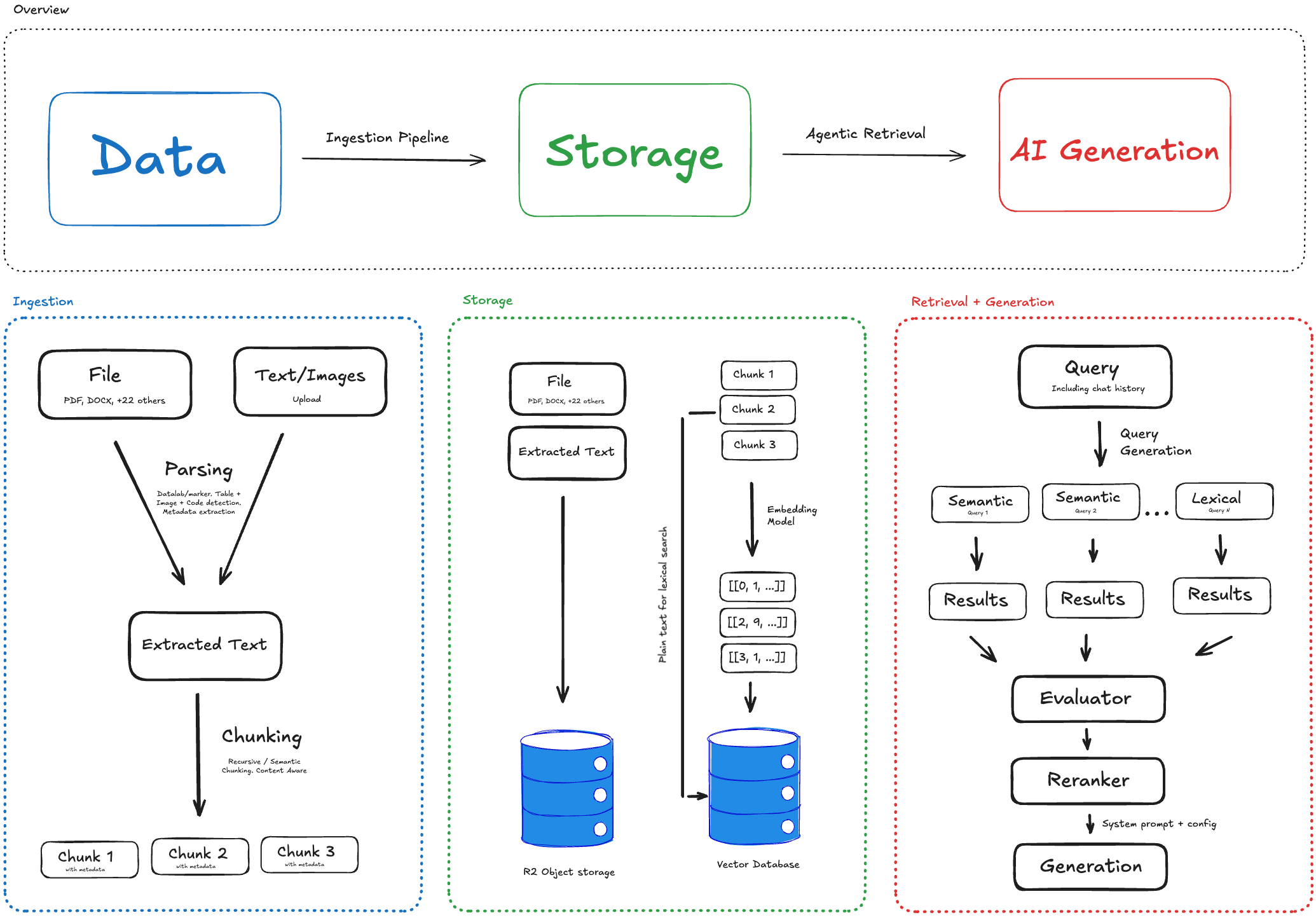 Agentset has three components: ingestion, storage, and retrieval.
### Ingestion
When you upload a file or text, it enters the ingestion pipeline:
1. **Parsing** — Documents are parsed to extract text, tables, and layout. Scanned content goes through OCR. [Multimodal content](/data-ingestion/multimodal-input) is either extracted using an LLM descriptor or natively embedded.
2. **Chunking** — Extracted text is split into chunks. Chunk boundaries respect sentence and paragraph structure. Specialized chunkers are used when processing [tables](/data-ingestion/tabular-data), [images](/data-ingestion/multimodal-input), and code blocks.
The ingestion pipeline runs asynchronously through a queue system. A 100-page PDF typically processes in under 60 seconds.
### Storage
Each chunk is embedded and stored in two places:
* **Object storage (R2)** — The original file, extracted text, and metadata are persisted for retrieval and future reprocessing. This is also used for the chunk viewer UI.
* **Vector database (Turbopuffer)** — Embeddings are indexed for semantic search. Chunks' plain text is used for lexical search. Turbopuffer caches hot namespaces on NVMe SSD, so subsequent queries to the same namespace are fast.
This set-up gives flexibility to do both semantic and lexical search, reprocess content when new improvements are made, and debug source content.
### Retrieval
Standard RAG pipelines embed the query, find the nearest vectors, and return results once. This approach covers only a limited portion of the search space, can't handle multi-hop questions, and is bound by chunk boundaries (i.e. if information is split across 2 or more chunks).
For question answering, Agentset runs agentic retrieval instead of single-shot search. A retrieval agent—heavily inspired by agentic coding tools such as Claude Code and Cursor—searches the namespace in a tool-calling loop until it can answer:
* **Search** — Run a semantic search (vector database + reranker) or a keyword search (lexical matching for exact terms) with a query the agent writes.
* **Expand** — Fetch the chunks before and after a result to read past chunk boundaries.
This approach results in higher recall and accuracy. See [benchmarks](/get-started/benchmarks) for accuracy comparisons against standard RAG. The [playground](/search-and-retrieval/playground) chat runs this loop out of the box, and [Agentic Search](/search-and-retrieval/agentic-search) shows how to build the same pattern on top of the search API.
## Next steps
* [Quickstart](/get-started/quickstart) — Build your first RAG pipeline
* [Benchmarks](/get-started/benchmarks) — Compare retrieval accuracy
* [Chunking settings](/data-ingestion/chunking-settings) — Configure how documents are split
* [Search](/search-and-retrieval/search) — Query your documents
* [Self-hosting](/open-source/prerequisites) — Deploy on your own infrastructure
Agentset has three components: ingestion, storage, and retrieval.
### Ingestion
When you upload a file or text, it enters the ingestion pipeline:
1. **Parsing** — Documents are parsed to extract text, tables, and layout. Scanned content goes through OCR. [Multimodal content](/data-ingestion/multimodal-input) is either extracted using an LLM descriptor or natively embedded.
2. **Chunking** — Extracted text is split into chunks. Chunk boundaries respect sentence and paragraph structure. Specialized chunkers are used when processing [tables](/data-ingestion/tabular-data), [images](/data-ingestion/multimodal-input), and code blocks.
The ingestion pipeline runs asynchronously through a queue system. A 100-page PDF typically processes in under 60 seconds.
### Storage
Each chunk is embedded and stored in two places:
* **Object storage (R2)** — The original file, extracted text, and metadata are persisted for retrieval and future reprocessing. This is also used for the chunk viewer UI.
* **Vector database (Turbopuffer)** — Embeddings are indexed for semantic search. Chunks' plain text is used for lexical search. Turbopuffer caches hot namespaces on NVMe SSD, so subsequent queries to the same namespace are fast.
This set-up gives flexibility to do both semantic and lexical search, reprocess content when new improvements are made, and debug source content.
### Retrieval
Standard RAG pipelines embed the query, find the nearest vectors, and return results once. This approach covers only a limited portion of the search space, can't handle multi-hop questions, and is bound by chunk boundaries (i.e. if information is split across 2 or more chunks).
For question answering, Agentset runs agentic retrieval instead of single-shot search. A retrieval agent—heavily inspired by agentic coding tools such as Claude Code and Cursor—searches the namespace in a tool-calling loop until it can answer:
* **Search** — Run a semantic search (vector database + reranker) or a keyword search (lexical matching for exact terms) with a query the agent writes.
* **Expand** — Fetch the chunks before and after a result to read past chunk boundaries.
This approach results in higher recall and accuracy. See [benchmarks](/get-started/benchmarks) for accuracy comparisons against standard RAG. The [playground](/search-and-retrieval/playground) chat runs this loop out of the box, and [Agentic Search](/search-and-retrieval/agentic-search) shows how to build the same pattern on top of the search API.
## Next steps
* [Quickstart](/get-started/quickstart) — Build your first RAG pipeline
* [Benchmarks](/get-started/benchmarks) — Compare retrieval accuracy
* [Chunking settings](/data-ingestion/chunking-settings) — Configure how documents are split
* [Search](/search-and-retrieval/search) — Query your documents
* [Self-hosting](/open-source/prerequisites) — Deploy on your own infrastructure